Describe the new location, light, and depth of field. ImageRework uses the full photo for context, then lets you mark hair edges or difficult boundaries for a second pass.
1
Upload photo
JPG, PNG or WEBP · up to 10 MB
Drop a photo hereor click to choose
Use a clear photo and one main change. Avoid explicit or graphic content. Avoid long passages of exact text, brand logos, and watermarks. Small generated lettering, including date stamps, may be inaccurate.
2
Describe the change
Say what to change and what to keep.
Upload a photo first to enable this button.
Charged only after a result is saved. Failed edits use 0 credits.
One prompt. A visible difference.
Before
After
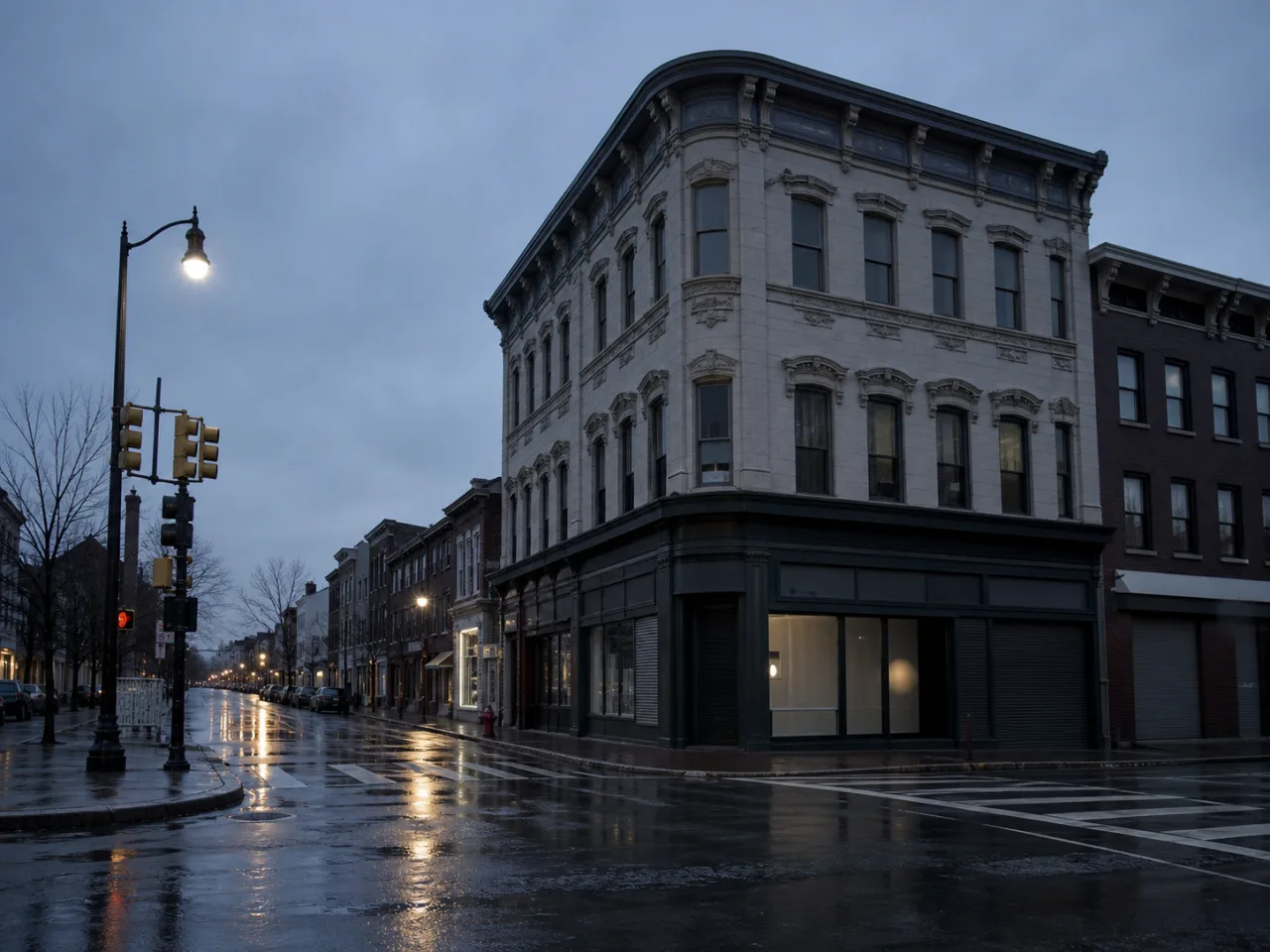
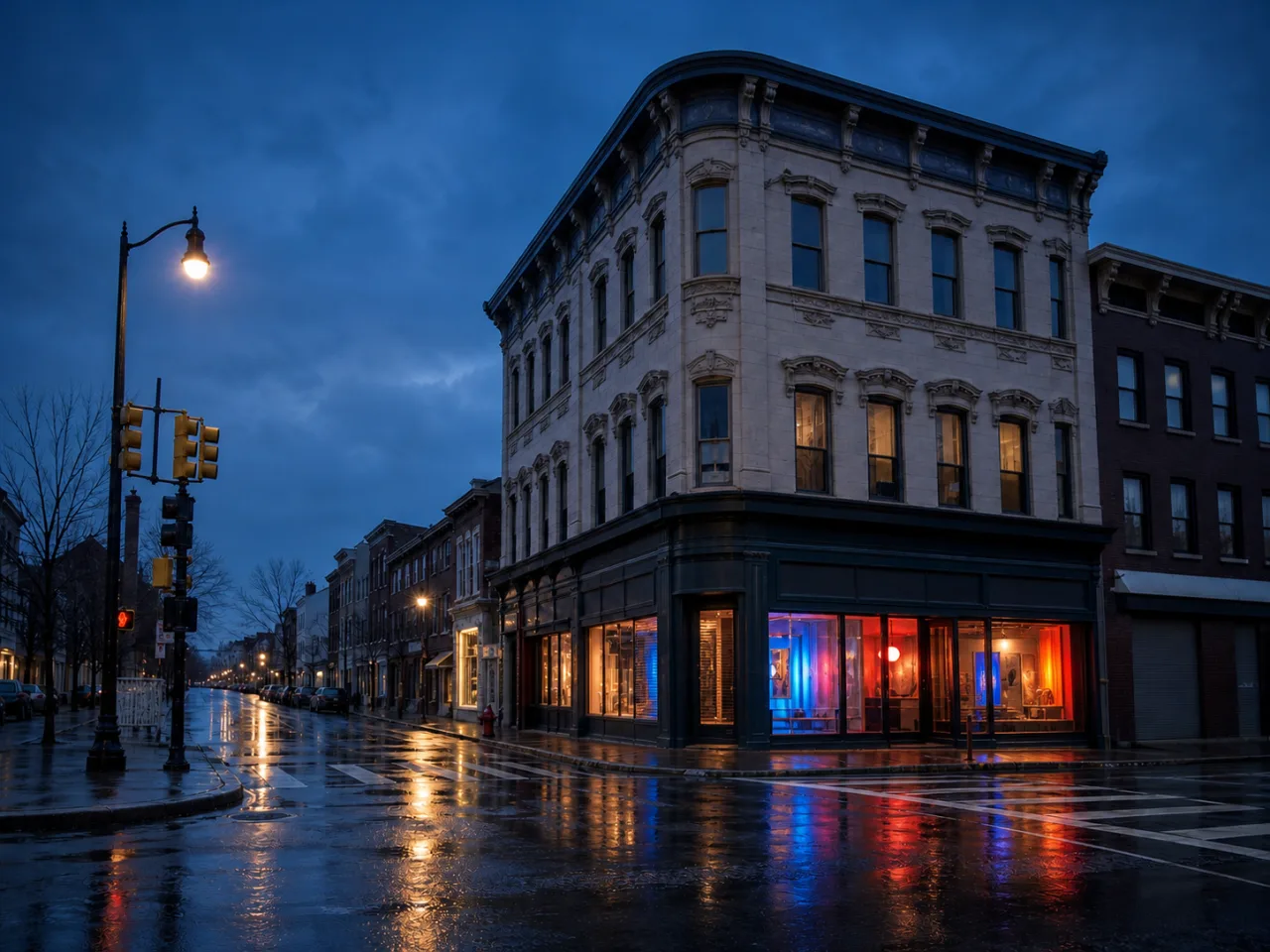
Demo prompt Open the corner shop with cobalt, coral, and amber light. Keep the building and camera angle.
✓Change the whole image
✓Compare before and after
✓Mark up to 5 areas to refine
Reviewed examples
What a specific prompt can change
Each example names both the requested change and the details that should be preserved.
Before
After
Build a campaign set around a product
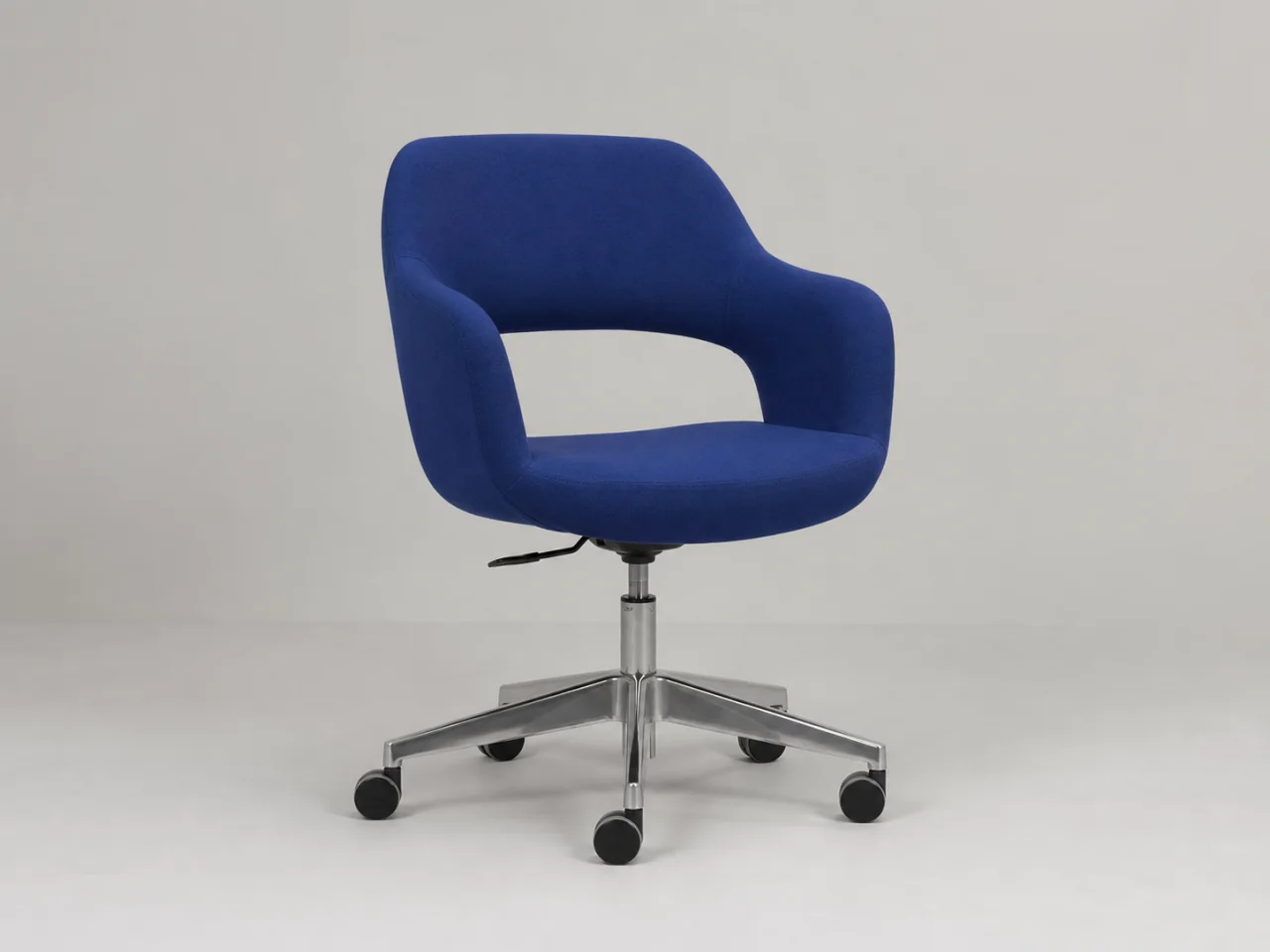
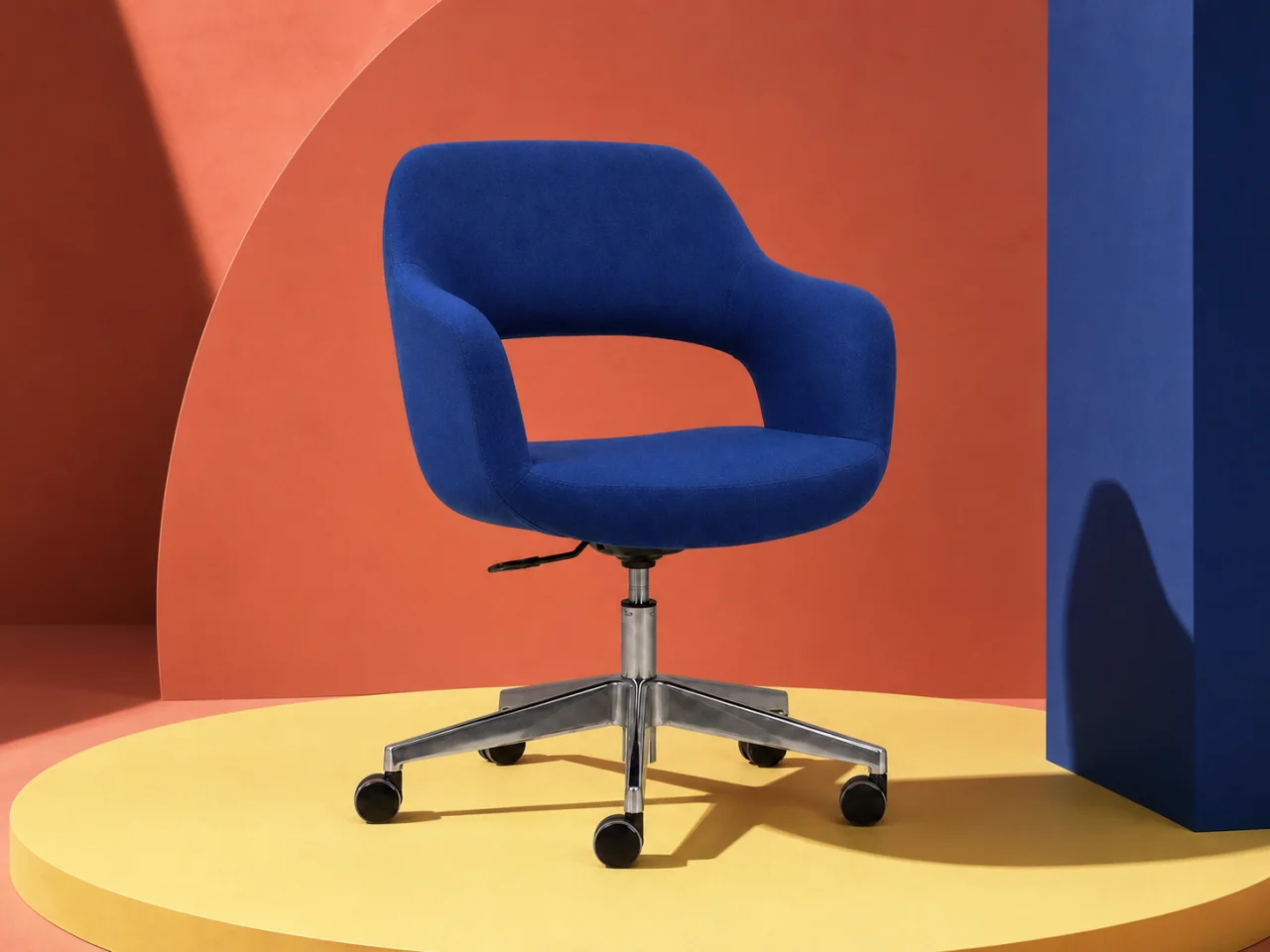
Prompt “Keep the cobalt chair and camera position unchanged. Replace the plain studio with a coral architectural set, an acid-yellow platform, directional light, and editorial shadows.”
Prompt “Change the closed corner storefront into a colorful contemporary art shop at night. Keep all architecture, windows, road markings, and camera perspective unchanged.”
Replace a background without making the subject look pasted in
A believable background change is a lighting and edge-matching task, not simply a location swap. The new scene must agree with the source camera height, perspective, depth of field, contact shadow, and light direction. The subject must keep its silhouette, internal details, and relationship to the ground. Write those requirements into the first prompt, then use marked refinement for the difficult boundaries.
Case 01
Place a product in a campaign set
Product work needs a strict protected list. Keep silhouette, proportions, material, labels, hardware, viewpoint, and contact point. Describe the new set through surfaces, palette, scale, and light rather than asking for a generic “luxury background.” The chair example uses a coral architectural wall and acid-yellow platform while the cobalt chair remains the anchor.
PromptReplace only the studio background with a coral architectural set and acid-yellow platform. Keep the chair, silhouette, materials, seams, legs, viewpoint, scale, and labels unchanged. Add directional light and a believable contact shadow.Use
Review: Inspect every outer edge, leg, seam, and label. The platform perspective should agree with the camera, and the contact shadow should connect the product to the set. Reject attractive versions that redesign the commercial asset.
Case 02
Create a professional portrait setting
Portrait replacement is most convincing when the requested location is visually restrained. Describe the environment, distance, blur, and light direction. Protect face, identity, skin tone, hair, clothing, pose, hands, and foreground. A busy office with hard detail can compete with the person and creates more opportunities for edge errors.
PromptReplace only the background with a bright contemporary workspace softly out of focus. Preserve the person's identity, face, skin tone, hair edges, clothing, pose, hands, foreground, framing, and exposure. Match the new light to the subject.Use
Review: Check hair, glasses, shoulders, fingers, and any gap between the body and arms. Look for a halo, color spill, inconsistent blur, or light that comes from the wrong side. Use one marker per difficult edge rather than rewriting the whole portrait.
Case 03
Change a real exterior while keeping the place recognizable
An exterior background can include architecture, road geometry, sky, vegetation, and reflections. Decide whether the building is the subject or part of the replaceable scene. In the storefront example, the structure and camera angle are protected while the closed frontage, sky mood, window light, and street reflections are transformed.
PromptChange the closed storefront into a contemporary art shop at night. Keep the building, roofline, windows, road markings, curb, neighboring structures, and camera perspective unchanged. Add cobalt, coral, and amber light with wet-street reflections.Use
Review: Compare the roofline, window grid, curb, vanishing point, and neighboring buildings before judging color. Reflections should align with light sources and road perspective. Mark a sign or window only after the underlying architecture passes.
Case 04
Handle glass, reflections, and thin edges as connected material
A glass bottle, window, glossy package, or pair of glasses contains parts of the old background through transparency and reflection. Replacing only the pixels behind it can make the object look cut out. Tell the editor to preserve the object's geometry and surface while adapting transmitted color, reflected light, and nearby shadow to the new environment.
PromptReplace the studio with a warm stone display shelf. Keep the glass bottle, cap, label, proportions, liquid color, and camera angle unchanged. Adapt only the transparent edge color, soft reflection, and contact shadow so they belong in the new warm light.Use
Review: Inspect both outer and internal glass edges, the label, highlight shape, liquid line, refraction, and contact shadow. If one reflection is wrong, mark that reflection for a child version rather than regenerating the complete product scene.
Choose the right amount of AI
One editor does not make every job the same.
Replace, do not merely remove
Use the background changer when the destination scene matters. Describe location, distance, atmosphere, depth of field, surfaces, and light so the model knows what belongs behind the subject.
Use removal for transparency
If the goal is a clean transparent cutout for later compositing, a dedicated background-removal or manual masking workflow may be more predictable than generating a new environment.
Refine complex boundaries
Hair, fur, glass, smoke, jewelry, bicycle spokes, and reflections relate to both foreground and background. Expect to inspect these areas and use a focused child version when needed. Preserve the accepted scene in the whole-image note and compare it again after refinement.
Before download
Review the image, not just the effect
The checklist turns an attractive result into a reviewable asset. Use it on every saved version, especially when the image contains identity, text, products, architecture, transparent material, or commercial claims.
The new location, distance, depth of field, surfaces, atmosphere, and light are described.
Subject identity, silhouette, pose, materials, labels, foreground, and framing are protected.
Perspective, camera height, ground plane, and contact shadow agree with the source.
Hair, fur, glass, reflective objects, gaps, and thin edges are inspected at full size.
The source and result are compared before any beauty or color judgment.
Commercial images receive a final label, logo, geometry, and color-accuracy review.
How to use it
One change first, detail second
1
Start with a clear source
Upload a JPG, PNG, or WEBP under 10 MB. Keep the subject and important edges visible.
2
Name change and preservation
Say what should change, then list the face, pose, product, text, or composition that should stay.
3
Inspect and refine
Compare before and after. Mark up to five areas for a more focused follow-up version.
Good fits
When to use this workflow
Professional profiles
Turn an everyday portrait into a cleaner profile image with a restrained background.
Product and catalog shots
Request a simple scene around the product while naming every edge and label that must remain unchanged.
Campaign setting changes
Explore a new location or season without rebuilding the original composition.
Scenes
Pick a scene, then upload
Solid colorReplace only the background with a smooth solid light-gray backdrop, evenly lit with no texture or gradient. Keep the subject, hair edges, clothing, pose, and framing unchanged. Add a soft shadow that matches the existing light.
Plain ID-styleReplace only the background with a plain, evenly lit off-white wall. Keep the face, expression, hair, clothing, head angle, and framing unchanged. Remove background shadows and keep the natural skin tone.
Product whiteReplace only the background with a seamless pure white studio sweep. Keep the product silhouette, proportions, labels, materials, color, and camera angle unchanged. Add a soft contact shadow beneath it.
LandscapeReplace only the background with a wide mountain lake in early morning light, softly out of focus. Keep the subject, pose, hair edges, clothing, and framing unchanged. Match the cool daylight on the subject.
OfficeReplace only the background with a bright contemporary office, softly out of focus. Keep the person's face, identity, hair edges, clothing, pose, and framing unchanged. Match the new light to the subject.
CafeReplace only the background with a warm cafe interior with soft depth of field. Keep the subject, face, hair edges, clothing, pose, and framing unchanged. Match the warm light naturally on the subject.